Friday, July 8, 2016

Office 365 Project Portfolio Dashboard Direct Link

Hello all

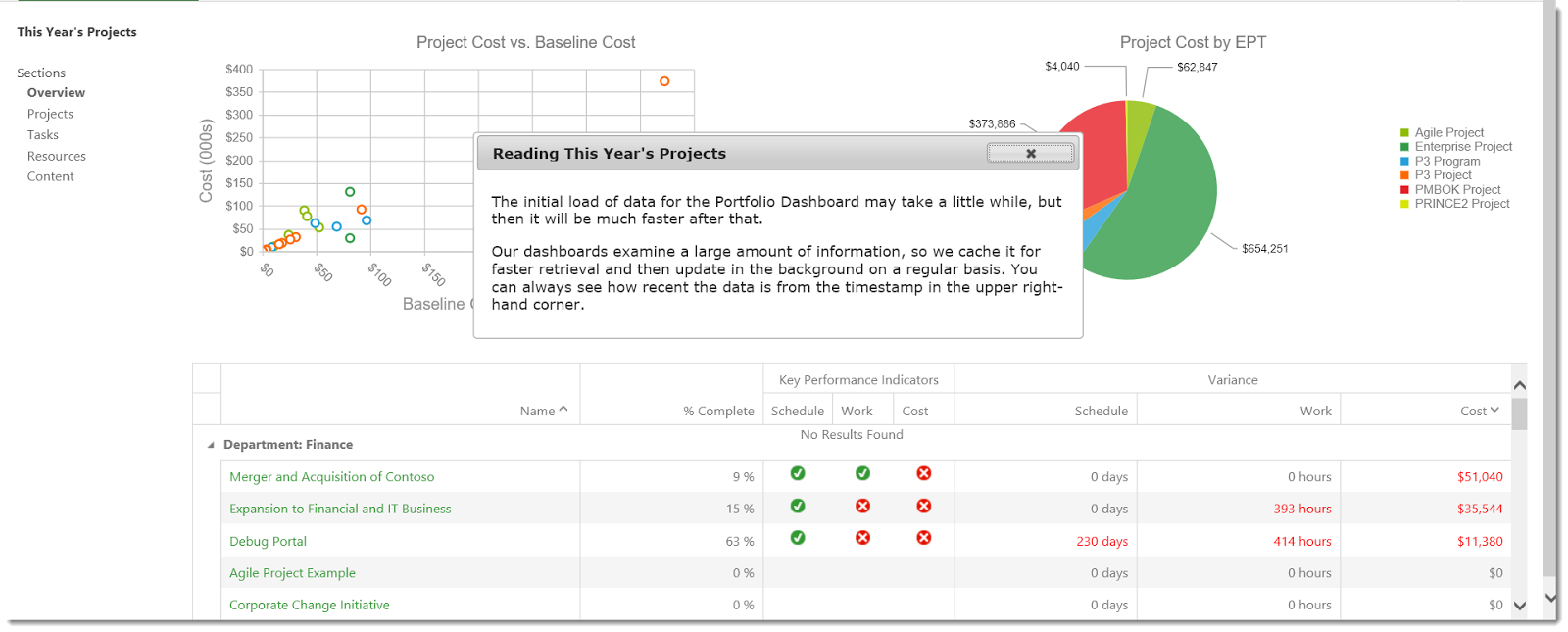
I've been playing those days with the Office 365 Project Portfolio Dashboard.

Doing so, I wanted to create a link to the dashboard from the quick-launch menu and from the report library.


Tip 1: The URL of the report seems ugly but can be simplified to

https://<your instance>.sharepoint.com/sites/pwa/dashboard


Tip 2: Use the new SharePoint style in the Report  library to include the link in your list of reports

Click on new / Link

Enter the above direct link to the dashboard

And here you go, a great link in your list of reports


Happy Dashboarding

pingback : Brian' comment in https://blogs.office.com/2016/04/19/new-office-365-project-portfolio-dashboard-apps-are-live/ 
Share this article :

Tuesday, June 28, 2016

Access Denied in Office 365 Project Portfolio Dashboard (Project Server Permission)

Hello all

A quick update today on the Office 365 Project Portfolio Dashboard.
Whilst I create the WoW effect in demonstrating the new Dashboard functionality to all of my customer, I recently faced an issue.

Microsoft has released a new version of the Dashboard that I was eager to download (as all new things)


As soon as I installed the latest version I encountered an issue accessing the Dashboard :(

Then, I tried different things, such as verifying that I am in the right Project Server group, reinstalling the app. None appears to resolve the issue.

While showing the case to Microsoft, something in the description of the dashboard jumped out at me:
Can you believe that, while using Project Server Permission mode, users have to be in BOTH Project Server group AND SharePoint group... bad point for the management of the security from my point of view as we have 2 places to manage the security.

Anyway, after adding myself to the Administrator for Project Web App group, I have now access back to the office 365 Portfolio Dashboard 


Side note : I tried to cheat the system to add an AD group to that group but unfortunately, the Dashboard is not picking up those groups.

Happy Dashboarding

Share this article :

Thursday, May 12, 2016

Project Online: Microsoft extends the boundaries!

Today I had in my todo list the task to manually deploy a beta package of the portfolio dashboard application on a customer tenant. That could be the topic of a future intersting article: I had to create a app catalog site, which I never did beofre, in order to upload the app. But I stop there, this is not what we are talking about today!

So back in the Sharepoint admin center, I saw something new. Just see by yourself:


Back in times, the first limitations for PWA instances was 3. Not so many... Then a few months later, the Project Online boundaries were extended and we could have up to 7 instances. So it seems like we can have 9,999 PWAs now! 
You'll say "what are you going to do with 9,999 instances??". I agree, but it could be usefull in some cases and I have experienced some. For large companies where it implies to much compromises to rationalize the PWA configuration and to get all the organization into a unique solution, you could need dedicated PWAs per Business Units. Having a test, training and prod instances for each BU, for 10 BUs you get 30 PWAs... 

Still far from 9,999, but I guess the important point here is that MS continues pushing away the cloud-based solutions boundaries. 9,999 almost means no limit at all, and this is a good message delivered to customers and consultants.

Share this article :

Wednesday, April 13, 2016

I'm now (again) Microsoft P-Seller for Project!!

Back in 2014, I wrote this post "I'm now a Microsoft P-Seller for Project!!" which was surprisingly one of the most popular on this blog, talking about being nominated as P-Seller Project for Québec province. I don't know if it is due to some spamming on the blog or because there is only a few blog talking about being P-Seller, but anyway, it was a successful article!

Going to the point, back in France, I'm now again P-Seller for South-West French area for Project.

I’ve located this text, which explains the program:

"The Microsoft P-Seller (former VTS-P) is a select group chosen from the elite in Microsoft’s partner community, whose focus is to augment Microsoft’s internal Technology Specialist team. Their primary role is to communicate the value of Microsoft Solutions to customers and to provide architectural guidance for Enterprise Integration solutions. The Microsoft P-Seller program was designed to create a deeper relationship with Microsoft Partners, the Product Teams at Microsoft Corporate, and Regional Microsoft Offices, in order to provide highly skilled solution specialists to Microsoft customers. It is designed to enable a high performance team of partner-based resources to deliver pre-sale activities and resources to empower customers and help them meet their solution and integration needs."


I now get access to information on the Microsoft corporate network such as knowledge bases, technical articles, training materials, and other resources. I also get guest access to Microsoft facilities, and priority for participating in Microsoft marketing events. This is a really great opportunity, I'm proud to be a part of this elite community, and I look forward to all that comes from it. 

Share this article :

Monday, April 11, 2016

Resource engagement: utilization calcuation setting

Hi,

If you are using Project Online or Project Server 2016, you might have activated the resource engagement new feature. In case you are not familiar with this functionality, you can read this post I wrote when the feature was released. It comes in replacment of the resource plans. An interesting capability of the resource plan was to set wheither the capacity/resource utilization was calculated from the project, the resource plan or both (specifying a transition date). 


Now where is this parameter? Navigating in the PWA capacity plans from the resource center, I couldn't find it. Got this answer thanks to the MVP distribution list, you have to set it using MS Project Pro, going to the project information. Note that the setting is available only for the published projects.


The "project plan until" still has the same behavior. This will trigger the utilization calculation from the project plan on a short term horizon until the specified date and then from the resource engagements.

Got it?

Share this article :