Friday, October 30, 2015

Power BI new visuals

Hi,

To continue on the PowerBI serie which is so far a great success, here is a quick post about the Power BI Desktop new visuals. A couple of weeks ago was announced the availability of a new visuals gallery. See here: https://app.powerbi.com/visuals


It allows you, assuming you have an up to date version of Power BI Desktop, it is as simpler as downloading the visuals and upload it to Power BI. Then just us it!!

Here is how to proceed: 

1 - Download the visuals 


2 - Import the visuals
Once you download the visuals, you can open in Power BI desktop application a new or existing file. You'll see the 3 little dots (I heard it is called an ellipsis, better than "3 little dots"...). From there, just pick-up your new visuals one by one.


3 - Use the visuals
Finally just select a visual and add data, dimensions, measures to have a nice and unseen graph!


Hope you'll enjoy all the effort Microsoft is putting on the PowerBI solutions and you'll take some time to play with it!

Share this article :

Thursday, October 29, 2015

Project Virtual Conference 2015: view my session in replay!

You couldn't attend my session on cost management at the Project Virtual Conference?? All sessions are available on-demand. Just log in with your credentials and enjoy!!

Here is the abstract of my session and the replay below.

"In this session, I’ll make a focus on cost management in MS Project. Intended to give to the end-users an overview of the various cost management features provided by the latest versions of MS Project, I’ll go through (among others) the cost resources, the budget resources, the cost rate tables and the reporting features for supporting cost management in MS Project.The objective of this session is to give clues to the day-to-day challenges project managers and PCOs face in terms of cost management while scheduling theirs projects, with the constraints of setting, tracking and reporting on costs."


Share this article :

Tuesday, October 6, 2015

Project roadmap

Hi Folks!

EDIT (2015 October 9th) : we have been asked by Microsoft not to share this roadmap on social media. Consequently I removed the screenshots and just let my introduction. Do not hesitate to contact me for a 1-1 presentation.

I'm excited to share with you the Project and Portfolio Management roadmap which has been presented last week. This was an excellent session done by Yuval Stern, Senior Product Marketing Manager at Microsoft for Office 365.


This roadmap was really dense and we had insights of the Microsoft strategy for Project. We also has some nice imageries so we can provide to our customers and partners a vision of what is ahead and get prepared. It is indeed a key factor of success for addressing our customers' needs and expectations to well understand Microsoft strategy and be proactive in terms of service offer.

So for those who missed the session, here is a quick catch-up session. I share with you below a few screenshots in order to make the roadmap more concrete. Note that it is only a long term vision for the PPM Microsoft solution. There are not committed features for future updates/versions and no release dates can be announced yet.

We can summarize the roadmap within 7 keys points:
  1. Redesigned user experience
  2. Agile
  3. Program management
  4. Financial management
  5. Out-of-the-box reports
  6. Native apps across devices
  7. Planner and wunderlist

Share this article :

Friday, October 2, 2015

Reawarded as MVP Project by Microsoft for the 2nd year!

Last year at the exact same time, I was awarded as MVP (Most Valuable Professional) Project by Microsoft.

I'm proud and honoured to have been reawarded this year for the second time. After experiencing the MVP Project community for one year now, I am so excited to share again our insights, discussions, ideas, complaints, questions with this skilled community incredibly support by our Project Group at Microsoft!

See more information here:
https://mvp.microsoft.com/en-us/Overview

Share this article :

Thursday, September 24, 2015

Resources engagement: finally available on Project Online!!

This is Christmas before Christmas!!
Guess what I saw this morning going to the server settings of my Online tenant!!! 
Figure 1: message in the server settings mentioning the availability of the new feature

It means that the new feature for resources engagement has been rolled up to Project Online tenants, at least for European located tenants. You might know that this is one of the greatest strength of Project Online: new features are automatically pushed on your tenant, you do not need to perform any requests and any IT operations.

That being said, the resource engagement feature comes in replacement of the existing resource plans. Thus there is a data migration operation from the resource plans to the resource engagement. This migration starts with the new feature activation in the additional server settings.
Figure 2: new feature activation
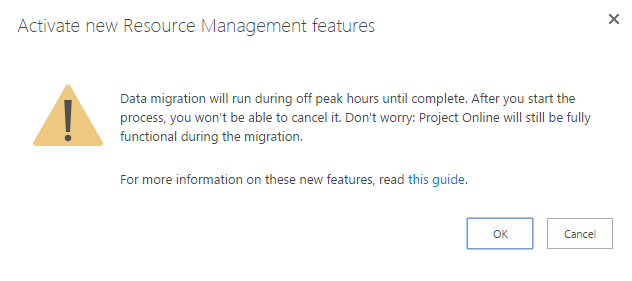
Then you get a warning message about the migration process, with a link toward a quick guide on the new feature :
Figure 3: warning message about the migration process
Once the migration done, the resource plans are discontinued and you can now access the resource engagement feature from the resource center. I'll not go into details since it has been blogged over and over, but after a few tests (I already had the opportunity to test it through the Technical Adoption Program), it looks really great. Note that you need MS Project Pro 2016 or Project Pro for O365 to use the new feature with Project Pro.

Just a few screen shots:
Figure 4: new button in the resource center

Figure 5: resource engagement ribbon
Figure 6: new request creation

Figure 7: requests created
Figure 8: capacity planning
Are you ready for this migration? Do not forget to first activate the feature on a test instance in order to test it with your customer and plan for the transition. I particularly think about how the resource plans data are exactly migrated as engagements. You'll also have some documentation, training and change management to perform and track along this process.

For the technical part, see the resource engagements like the resource plans. It creates engagement work which is stored separately in the DB. It doesn't rollup in the project plan but is accessible for reporting. One question for me concerns the capacity in the portfolio module, but I'll get back to you as soon as I get an answer.

One last thing I find important to mention: this feature is NOT INTRUSIVE. Meaning that it does not prevent a project manager to assign a resource in his project even if the request has been rejected. On the contrary, if a request has been accepted, it doesn't automatically assign the resource on a task (anyway, which task?) or even in the project team. This is more about supporting the communication process between project managers and resource managers.

Share this article :